01 · The brief
Nothing to install. No account. No cloud.
Everything I'd tried failed in one of four ways, so the brief wrote itself. The other device needs nothing but a browser. Nobody makes an account. Files never leave the room, and they arrive exactly as they left — big ones included.
One rule sat above the rest: it has to feel like scan and go. Every later decision, security included, had to fit through that door.
02 · The whole thing at a glance
One app, two halves.
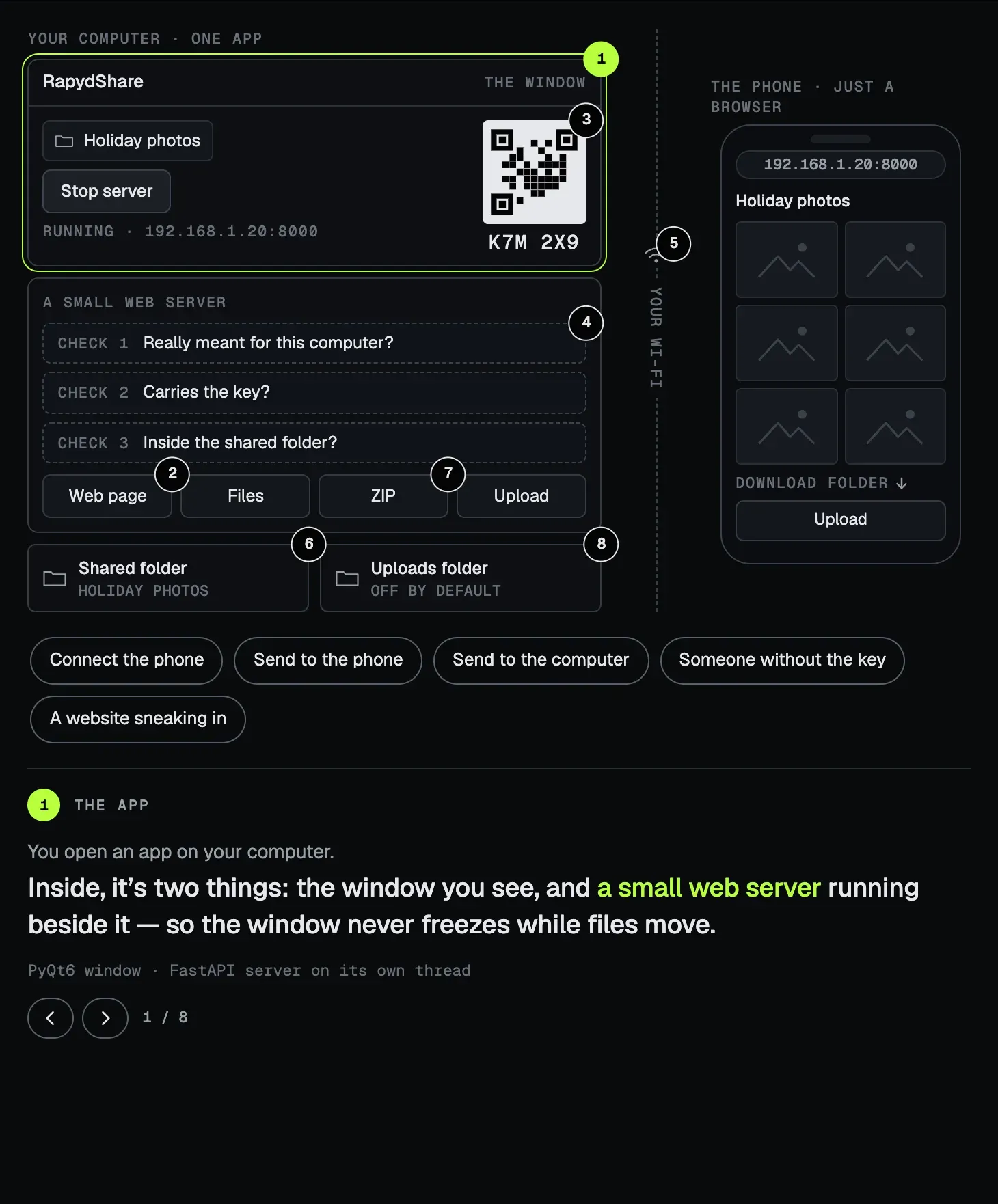
Your computer runs one app. Your phone runs a browser. In between, your own Wi-Fi. Tap a number to open a part, or press a play to send a request through it — and try to break in while you're there.
03 · One scan and you’re in
The scan is the login.
The QR code holds two things: the address, and a key. So scanning it is signing in. No screen asks who you are.
The key is six characters, new every time you press Start, and it leaves out the ones people misread, like 0 and O or 1 and I. Typed the address by hand? The page asks for the key in six boxes, like a code from your bank. Guess wrong five times and it starts making you wait, longer each time.
04 · Only what you meant to share
It won't let you share too much.
A file-sharing app is one wrong folder away from sharing everything. So RapydShare refuses the big ones — your whole home folder, the system drive, system folders — and asks for something smaller.
Hidden files never show up, even if someone asks for one by name. Every request is checked against the folder you chose. Even a website open on the phone can't reach it behind your back. And because the connection isn't encrypted, the app says so, plainly: use it on networks you trust.
05 · Big files, no waiting
Full size, no detour.
Files travel over your Wi-Fi and nothing else: no upload to a server, no download back, nothing squashed on the way. Photos and videos get thumbnails and previews, so you can see what you're taking before you take it.
Want a whole folder? It's zipped while it downloads, a piece at a time, so it starts straight away and never needs a copy on your disk.
06 · Sending files back
Both ways, at last.
iPhone to PC is an upload, so uploads aren't an extra here — they're half the point. They stay off until you switch them on, and they land in a folder of their own.
Nothing gets overwritten: a second photo.jpg becomes photo (1).jpg. A single file can be 20 GB, and RapydShare always leaves 1 GB free on your disk. Files that arrive are marked as downloaded from the internet, so your computer checks them before they open.
07 · Making it better after it worked
Six releases, and a security review.
Version 1.0 shipped in December 2025: Windows only, with an optional username and password. Later that month a pull request from @Jayakrishna45 added the QR code. That was v1.1, and the start of scan and go. Uploads came in April 2026, and the Mac in October.
Then I put v1.3 through a security review and went through all 22 findings myself. Three were calls only I could make. The password went, and the key moved inside the QR code. The folder became yours to choose, every time. And HTTPS stayed out for now — a certificate warning on a phone would break the scan — so the app says plainly that the connection isn't encrypted. v1.4 fixed all 22, and the scan didn't get any harder.