01 · The brief
Making trades simple.
Trading used to mean watching the screen: waiting for the entry, then watching again for the exit.
So I built a platform that watches for me. A strategy opens a trade when its rules say so and closes it when they say so. I can step away, and the entries and exits still happen — on time, and without emotion. It trades through Zerodha every market day.
Strategies are added, not built in. You write one as a single file and the platform picks it up. You backtest it on past prices, run it on paper against the live market, and tweak its settings until it has earned live money.
02 · The whole thing at a glance
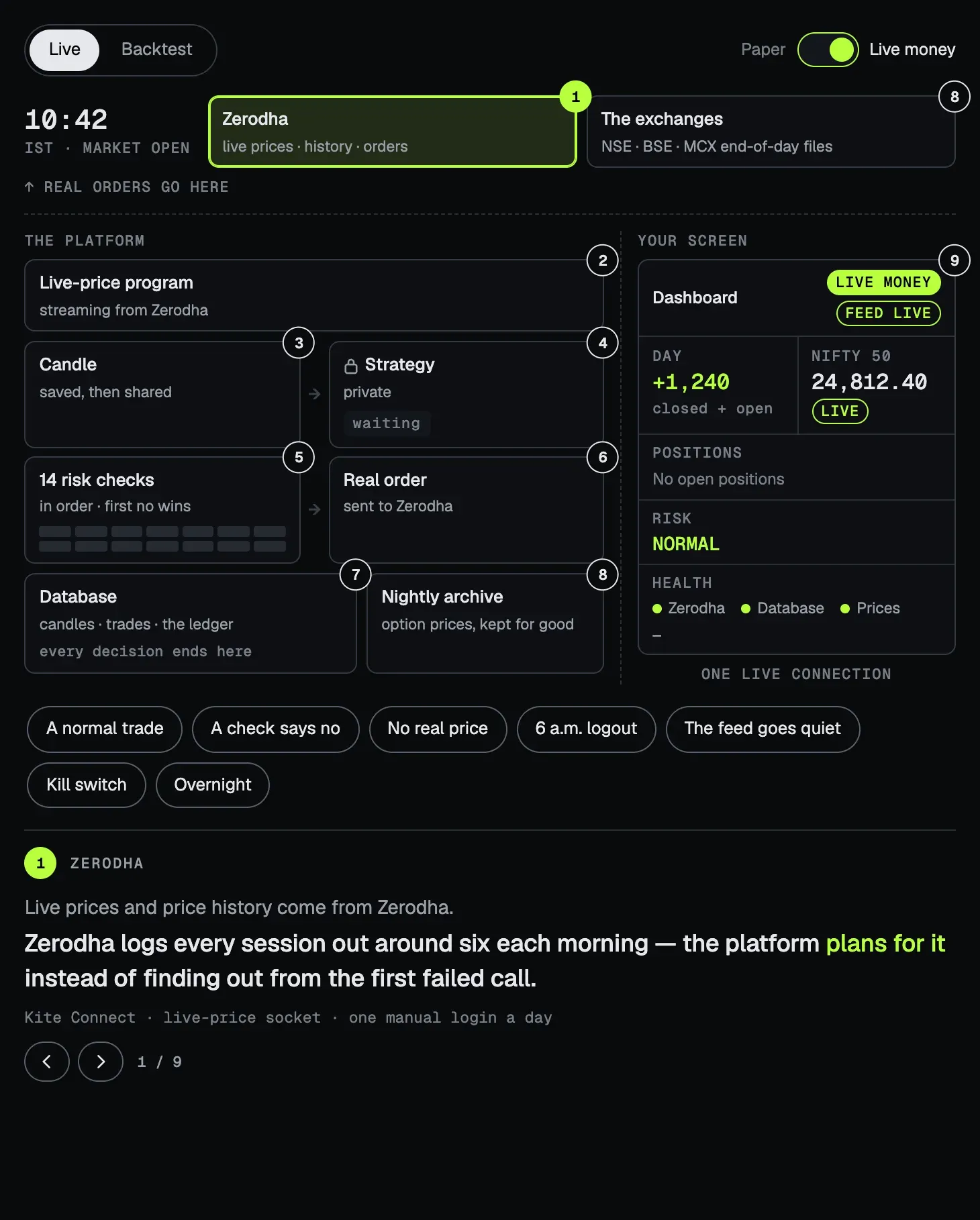
From a price to a position.
Prices come in from Zerodha; your screen shows what happened. Tap a number to open any part, or press a play and watch a trade go through — flip it to paper, or switch to backtests.
03 · A strategy is one file
Drop it in; the platform does the rest.
A strategy is a single Python file in a folder. The platform finds it, feeds it candles and indicators, keeps its positions, checks its risk, fills its trades, builds its settings form and backtests it. The strategy only decides.
That folder is read-only on the live server. Its files run when the platform starts, so a way to write into it would be a way to run anything.
Even the settings form is checked in the browser without running generated code: its validators are compiled from the strategy's own schema when the site is built, because the site's security policy forbids code made on the fly.
04 · How it's built
One process at the centre.
The backend is one FastAPI process, on purpose. Candles, strategies, risk checks and fills all run inside it and hand each other events directly — no message broker, and no extra service on a small server. The cost is that an event is delivered at most once, so anything that matters is saved before it's passed on. And there can only ever be one: a second copy refuses to start, because two would sign each other out of Zerodha.
Live prices come in through a small program of their own for each Zerodha session, handed over through Redis. Candles, trades, every decision and the price archive live in PostgreSQL with TimescaleDB. The screens are a Next.js app on one live connection. It runs on AWS Lightsail as ten Docker containers, close to the exchanges and behind Cloudflare: the app, its database, Redis, nginx, and the monitoring around them.
05 · No hand on the button
The rules trade. Nobody approves.
Early on, each trade waited in a queue for a person to approve it. I removed the queue. Every trade is automatic now — a human pressing yes at the last second is exactly the emotion I wanted out.
What replaced the person is structure. Fourteen checks before every entry. The day's loss, read every five seconds — one number, the same one the screen shows. A kill switch that closes everything it can, and won't release while trades still wait to close or the day's loss is past its limit.
06 · Refuse, never guess
No price, no trade.
Trading at whatever price the screen last showed is how a strategy pays for prices that were never there. Black Meridian works down a ladder of real prices instead, and when none is good enough, it does nothing and says why.
A zero is never a price. Zerodha pads an empty level of the order book with 0.0, and that number can't become a fill, a mark or a stop. A position with no price is kept open, never closed at what it cost.
Zerodha also ends every session around six each morning. I chose to log in by hand each day rather than automate it, so the platform treats the logout as part of the routine: the screen asks for the morning login, and until it's done nothing trades and nothing guesses.
07 · Nothing happens without a trace
Even doing nothing is recorded.
From the outside, a quiet day and a broken pipeline look the same: nothing happens. So when the platform doesn't trade, it says why. Every signal a strategy sends ends in exactly one recorded outcome — filled, refused or dropped — with its reason, so a trade that didn't happen can be traced as surely as one that did.
The outcome is written in the same database transaction as the money it describes, inside a savepoint of its own. If writing it ever fails, only the record rolls back: the trade still completes — a stop-loss is never held up by its own paperwork — and the lost record is logged and counted.
08 · The price archive
Backtests on real market prices.
Black Meridian keeps its own archive of option prices for backtesting. Every night it saves the minute-by-minute prices of each option it needs — real market data, as it traded — and checks each day against the exchange's own end-of-day file. The archive is permanent, so a contract's prices stay available for backtests long after it expires.
Before a backtest runs, it shows how many of its days the archive holds. During the run, every fill is tagged with where its price came from, so a result can always be traced back to its data.
09 · Screens that never look calmer
Unknown, stale and failed are states.
The usual failure of a trading screen is a calm display over dead data — zeros after a failed fetch, a green dot over an old price. Here unknown, stale and failed each have their own words and colours, and staleness can only ever raise the alarm.
When the live feed goes quiet, the screens say so. The price strip marks each index with the age of its last price — 4m — and ends in No ticks. A banner reports the Kite connection as unstable and reconnecting. Unrealised profit turns amber and says it's stale — no live price feed, the charts wait on the Kite session, and the health bar counts the seconds since the last tick. A kill switch nobody can read shows unknown, never safe.
10 · Run by one person
The system tells me what's wrong.
There's no team on call — just me. So the system reports on itself. Every background job sends a heartbeat, and a job that's blocked, not broken, still goes quiet — it can't hide behind a clean error count. Grafana draws it all: eleven dashboards, kept as code, reading 79 measurements the platform takes of itself — the workers, trading, the broker and the live feed, risk and the kill switch. Sentry catches errors from the server and the screens as they happen, with broker keys, tokens and passwords scrubbed before anything leaves.
11 · What's next
Trades that tell you.
The platform trades so I don't have to watch the screen — but what it does is still only shown on the screen: the app's own pop-ups and its activity feed, while the app is open.
Next is a notification system for trades. Every entry and every exit, and every trade it refused with the reason, sent the moment it happens — so stepping away never means losing track of what the platform did.